
Software may work perfectly on a developer’s laptop and fail as soon as it is moved to another computer.
The new environment might use a different operating-system version, have an incompatible software library or lack a required configuration file. Developers often summarise this frustrating situation with a familiar sentence: “It works on my machine.”
Containerization was created to make software more portable and consistent.
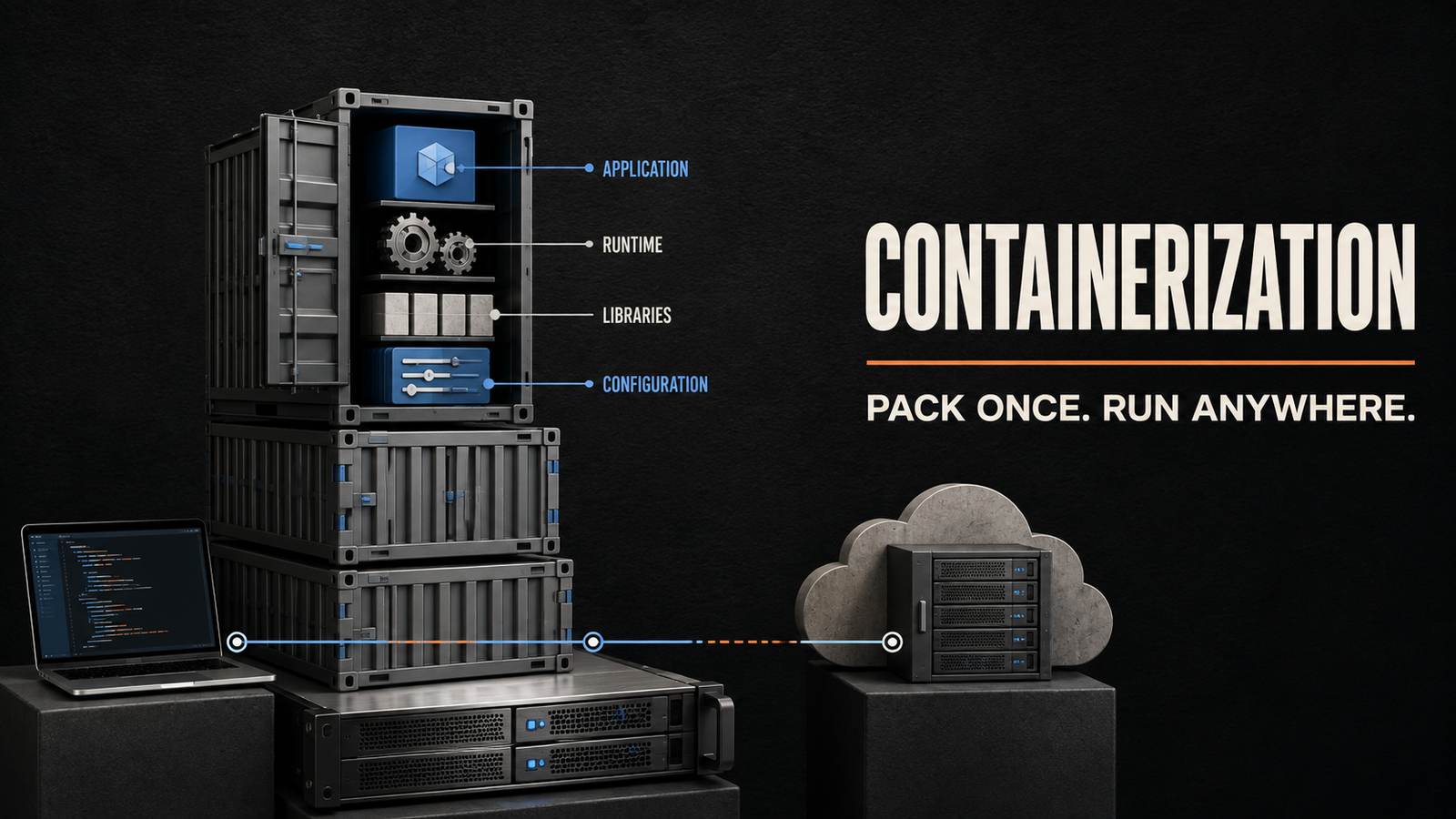
A container packages an application together with the libraries, configuration files and other dependencies it needs to run. The same container can then be deployed across different compatible environments with fewer unexpected differences.
Containers have become an important part of cloud computing, application development, software testing and automated deployment. They make it easier for teams to build applications as smaller services, move software between environments and increase capacity when demand changes.
But what exactly is containerization, how does it work, and how is a container different from a virtual machine?
What Is Containerization?
Containerization is a method of packaging an application and its required dependencies into an isolated, portable unit called a container.
The container includes the components the application needs, such as:
- Application code
- Software libraries
- Runtime components
- Configuration files
- System tools
- Environment settings
This package behaves consistently across compatible environments.
A developer can run the container on a laptop, send it to a testing environment and later deploy it to a cloud server. The underlying infrastructure may change, but the application inside the container retains the same packaged dependencies and configuration.
Containers share parts of the host operating system rather than carrying a complete operating system of their own. This generally makes them smaller and faster to start than full virtual machines.
Why Is Containerization Needed?
Modern applications often depend on a complex combination of software components.
An application may require a particular programming-language version, database client, system library and set of environment variables. Installing and configuring everything manually on every server can produce errors.
Suppose one application requires an older version of a library while another application needs a newer version. Installing both directly on the same server could create a conflict.
Containers give each application an isolated environment.
The applications can run on the same host while using different library versions and configurations. This reduces dependency conflicts and makes deployments more predictable.
How Does Containerization Work?
Containerization relies on several components working together.
Container Image
A container image is a packaged, read-only template used to create containers.
It contains the application and the files required to run it. Developers normally build an image from a set of written instructions describing the base environment, dependencies and application code.
Images are commonly organised into layers.
One layer might contain a minimal operating-system environment, another may contain the application runtime, and a later layer may contain the actual code. When a change is made, only the affected layers may need to be rebuilt or transferred.
Container
A container is a running instance of a container image.
The image acts like a blueprint, while the container is the active application created from that blueprint.
Multiple containers can be created from the same image. Each container operates in its own isolated environment while sharing the host system’s kernel.
Container Runtime
The container runtime is the software responsible for creating, starting, stopping and managing containers.
It works with operating-system features that isolate processes and control their access to memory, storage, networking and computing resources.
Container Registry
A container registry stores and distributes container images.
A development team can build an image, upload it to a registry and allow authorised systems to retrieve it for testing or deployment.
Registries may be public, private or managed within an organisation.
Host Operating System
Containers use the kernel of the host operating system.
The kernel manages core functions such as memory, processes, networking and device access. Because containers share this layer, they do not need to include a complete independent operating system.
This is one of the main differences between containers and virtual machines.
A Simple Containerization Example
Imagine a development team building an online shopping application.
The application requires:
- A specific programming-language runtime
- Several software libraries
- A web server
- Configuration settings
- Application code
Without containers, the team must install and configure these components in every development, testing and production environment.
If one server uses a different library version, the application may behave differently.
With containerization, the team packages the code, runtime, libraries and configuration into one container image.
Developers use that image on their laptops. The testing system uses the same image, and the production server deploys it later.
The surrounding infrastructure may be different, but the packaged application environment remains consistent.
Containers vs Virtual Machines
Containers and virtual machines both isolate applications, but they do so at different levels.
A virtual machine includes a complete guest operating system. A hypervisor allows several virtual machines to share the same physical hardware.
A container shares the host system’s kernel and packages only the application and its required environment.
| Feature | Containers | Virtual Machines |
|---|---|---|
| Operating system | Share the host kernel | Include a complete guest operating system |
| Size | Usually smaller | Usually larger |
| Start time | Often starts quickly | Typically takes longer to start |
| Isolation | Process-level isolation | Stronger operating-system-level separation |
| Resource usage | Generally lower | Generally higher |
| Portability | Highly portable across compatible environments | Portable as complete machine images |
| Best suited for | Applications, services and automated deployment | Complete operating systems and strongly separated workloads |
Containers are not universally better than virtual machines.
Virtual machines can provide stronger separation and allow different operating systems to run on the same physical server. Containers are more lightweight and convenient for packaging applications.
Many organisations use both. Virtual machines provide infrastructure-level isolation, while containers run applications inside them.
What Is Container Orchestration?
Running a few containers manually is relatively straightforward. Managing hundreds or thousands across multiple servers is much more complicated.
Container orchestration is the automated coordination of containerised applications.
An orchestration platform can:
- Schedule containers across available servers
- Restart failed containers
- Increase or decrease the number of instances
- Distribute network traffic
- Manage service discovery
- Apply configuration
- Coordinate application updates
- Monitor container health
- Manage storage connections
Suppose an online store experiences a sudden increase in traffic. The orchestration system may start additional containers to handle the demand.
When traffic decreases, it can remove unnecessary instances to reduce resource consumption.
Benefits of Containerization
Containerization offers advantages throughout the software-development lifecycle.
Consistent Environments
Containers package the application environment with the code.
This reduces differences between development, testing and production and makes software behaviour more predictable.
Faster Deployment
A container does not need to start an entire guest operating system.
It can often begin running quickly, which helps organisations deploy applications and respond to changes faster.
Portability
A container image can move between compatible laptops, data centres and cloud platforms.
This portability can reduce dependence on the manual configuration of individual servers.
It does not guarantee that every application will work identically everywhere. Differences in processor architecture, operating-system kernels, networking and storage may still matter.
Efficient Resource Usage
Multiple containers can share one host operating system.
This usually allows more application instances to run on the same hardware than would be possible with a separate virtual machine for every service.
Application Isolation
Each container has its own process space, file system and network configuration.
This reduces conflicts between applications, although the containers still share the host kernel and must be secured accordingly.
Easier Scaling
Teams can start additional instances of a container when demand grows.
Because every instance is created from the same image, scaling is more consistent than manually preparing new servers.
Support for Automated Delivery
Containers work well with automated software-development pipelines.
A pipeline can build an image, run tests, scan it for vulnerabilities and deploy it to an approved environment.
Simpler Rollbacks
If a new application version fails, the team may be able to redeploy an earlier image.
This makes recovery more predictable, provided that database and configuration changes remain compatible.
Common Uses of Containers
Containers can support many types of applications and development processes.
Microservices
A microservices architecture divides an application into smaller services.
One service might handle user accounts, another payments and another product search. Each service can run in its own container and be developed or scaled independently.
Web Applications
Web servers, application code and supporting services can be packaged into containers.
This makes it easier to reproduce the application environment across development and production.
Automated Testing
Testing systems can create temporary containers for each test run.
Once testing is complete, the containers can be removed. This gives each test a clean and consistent environment.
Continuous Integration and Delivery
Development pipelines use containers to build, test and deploy software automatically.
The same packaged image can pass through multiple approval stages before reaching production.
Data Processing
Containers can run scheduled jobs, data transformations and analytics workloads.
They can be created for a task and stopped when the processing is complete.
Machine Learning
Machine-learning applications depend on particular frameworks, libraries and hardware configurations.
Containers can package these dependencies and help teams reproduce training or inference environments.
Hybrid and Multi-Cloud Applications
Containers can make applications more portable across internal infrastructure and different cloud environments.
However, complete portability also depends on networking, storage, databases and cloud-specific services.
Development Environments
Containers allow developers to create repeatable local environments without installing every dependency directly on their computers.
Different projects can use different tool versions without creating conflicts.
Containers and Cloud Computing
Containers are closely associated with cloud computing because they are lightweight, portable and easy to scale.
A cloud platform can run containers on virtual machines, managed container services or serverless container infrastructure.
The application team focuses on the container image, while the platform may handle tasks such as server management, networking and scaling.
Containers can also run in private data centres or on individual computers. They are not limited to public cloud environments.
Are Containers Secure?
Containers provide isolation, but they should not be treated as perfect security boundaries.
Because containers share the host kernel, a serious vulnerability in the kernel or runtime could affect multiple workloads.
Other risks include:
- Vulnerable container images
- Excessive permissions
- Embedded passwords or API credentials
- Outdated software libraries
- Untrusted public images
- Insecure network settings
- Poorly protected registries
- Misconfigured orchestration systems
Organisations can improve container security by:
- Using small, trusted base images.
- Regularly scanning images for known vulnerabilities.
- Removing unnecessary software.
- Running applications without administrator privileges.
- Keeping runtimes and host systems updated.
- Protecting registries with strong access controls.
- Storing credentials in dedicated secret-management systems.
- Restricting communication between services.
- Monitoring container behaviour.
- Rebuilding images when dependencies receive security updates.
Containers are most secure when they are part of a layered security strategy.
What Is an Immutable Container?
Containers are often designed to be immutable.
An immutable container is not manually modified after deployment. If the application needs an update, the development team builds a new image and replaces the old container.
This approach creates a clear record of what has been deployed.
Manual changes made directly inside running containers may disappear when those containers restart. They can also make one instance different from the others.
Immutable deployment encourages teams to treat infrastructure and configuration as repeatable code.
Containers and Persistent Data
Containers are often temporary. An orchestration platform may stop one instance and start another at any time.
This creates a challenge for information that must survive container replacement.
Persistent data is normally stored outside the container’s temporary file system. The application connects to:
- External databases
- Managed storage services
- Network storage
- Persistent volumes
- Object storage
Separating application containers from persistent data allows containers to be replaced or scaled without losing important information.
The storage system still requires backups, access controls and maintenance.
Limitations of Containerization
Containerization solves several problems, but it also introduces new complexity.
Operational Complexity
A large container environment requires networking, storage, monitoring, security and orchestration.
Teams need appropriate skills and processes to manage it reliably.
Shared Kernel
Containers on the same host share an operating-system kernel.
This improves efficiency but creates security and compatibility considerations.
Difficult Troubleshooting
Containers may be temporary and distributed across many servers.
A failing instance could disappear before an engineer inspects it. Centralised logs and monitoring are therefore essential.
Persistent Storage Challenges
Stateless applications are relatively easy to containerise.
Databases and other stateful systems require careful management of storage, backups and recovery.
Unnecessary Fragmentation
Dividing a simple application into too many small services can make it harder to understand and operate.
Microservices and containers should be adopted because they solve a real problem, not simply because they are popular.
Image Management
Organisations may accumulate thousands of images and versions.
Old, vulnerable or unused images must be identified and removed from active deployment processes.
When Should a Business Use Containers?
Containers may be a good choice when an organisation needs:
- Consistent application environments
- Frequent software releases
- Automated testing and deployment
- Independent scaling of application services
- Portable workloads
- Isolation between software dependencies
- Efficient use of computing resources
They may not be necessary for a small, stable application running reliably on one server.
The operational cost of containerization should be justified by development, deployment or scaling requirements.
Frequently Asked Questions About Containerization
What is containerization in simple terms?
Containerization packages an application and everything it needs into an isolated unit that can run consistently across compatible computing environments.
What is a software container?
A software container is a running, isolated instance of a container image. It contains an application and its required libraries, runtime and configuration.
Is a container a virtual machine?
No. A virtual machine includes a complete guest operating system. A container shares the host system’s kernel and packages the application environment.
What is a container image?
A container image is a read-only template used to create containers. It contains the application code and required dependencies.
Can containers run on any operating system?
Containers are portable across compatible environments, but they still depend on the host architecture and kernel capabilities. Additional virtualisation may be used when the host system differs.
Do containers store data permanently?
Containers can store temporary data, but important information should normally be placed in persistent external storage or dedicated volumes.
Are containers only used in the cloud?
No. They can run on developer laptops, private servers, data centres, cloud platforms and edge systems.
What is container orchestration?
Container orchestration is the automated deployment, scaling, networking, monitoring and recovery of containerised applications across computing infrastructure.
Final Thoughts
Containerization gives software teams a reliable way to package applications and move them between environments.
By combining application code, libraries, runtimes and configuration into one portable unit, containers reduce dependency conflicts and make deployments more consistent.
They can start quickly, use infrastructure efficiently and support automated scaling. These qualities make them valuable for web applications, microservices, development pipelines, data processing and cloud computing.
Containers are not complete virtual machines, and they do not remove the need for security, monitoring, storage planning or operational expertise.
A containerised application can still fail because of weak architecture, vulnerable dependencies or poorly managed infrastructure.
When used for the right reasons, however, containerization can replace “it works on my machine” with a more reliable promise: the same packaged application can run consistently wherever a compatible container environment is available.