
Generating a lead is only the beginning of the customer-acquisition process.
After someone submits a form, calls the business, sends a message, or books a consultation, the inquiry needs to be recorded, assigned, contacted, qualified, and moved through the appropriate sales stages.
If this process is not organized, valuable leads can be lost even when the marketing campaign is working correctly.
A salesperson may forget to call an inquiry. Two representatives may contact the same person. A lead may remain inside a spreadsheet without an owner. The marketing team may report a high number of conversions, while the sales team claims that very few useful opportunities were received.
CRM lead management helps prevent these problems.
A customer relationship management system creates a central record of every lead and the actions taken by the business. When used properly, it connects marketing campaigns with sales activity and provides a clearer view of what happens after a conversion.
The objective is not simply to store contact information. The objective is to ensure that every valid lead has an owner, a current status, and a clear next action.
1. What Is CRM Lead Management?
CRM lead management is the process of capturing, organizing, assigning, qualifying, and tracking prospective customers inside a customer relationship management system.
A CRM lead record can contain information such as:
- Name
- Phone number
- Email address
- Company name
- Service required
- Original traffic source
- Campaign name
- Lead score
- Qualification status
- Assigned sales representative
- Previous communication
- Next follow-up date
- Proposal status
- Final sales outcome
The CRM becomes the operational connection between marketing and sales.
Marketing creates demand and generates inquiries. The CRM records what happens after those inquiries enter the business. Sales representatives use it to manage conversations and move suitable prospects toward a purchase.
A CRM is therefore more than a digital address book. It is the working system through which leads become opportunities and customers.
2. Why Do Businesses Need a Lead Management System?
Lead management becomes difficult when inquiries arrive through several channels.
A business may receive leads from:
- Website forms
- Search advertising
- Social-media advertising
- Phone calls
- Email campaigns
- Referral partners
- Organic search
- Appointment-booking pages
- Offline events
Without a central system, these inquiries can become scattered across spreadsheets, email inboxes, messaging applications, call logs, and individual employees’ notes.
This creates several risks:
- Leads may not receive a timely response.
- Contact information may be entered incorrectly.
- Follow-up history may be lost.
- Multiple representatives may contact the same lead.
- Sales opportunities may remain unassigned.
- Lead sources may not be recorded.
- Marketing cannot connect campaigns with sales.
- Managers cannot see where opportunities are becoming stuck.
A CRM provides one location where the business can track each lead from the first inquiry to the final outcome.
3. Why Are Spreadsheets Not Always Enough?
Spreadsheets can work for a small number of leads or during the early stages of a business.
They are flexible, familiar, and easy to create. However, problems begin to appear as lead volume, team size, and follow-up complexity increase.
A spreadsheet usually depends on people remembering to:
- Add new leads manually
- Update the correct row
- Record every call
- Enter the next follow-up date
- Avoid creating duplicates
- Preserve campaign information
- Notify another team member
- Change the lead status
- Record the final sales outcome
A CRM can make many of these actions easier to control.
It can assign owners, create tasks, preserve communication history, identify inactive opportunities, and generate pipeline reports.
The decision is not about whether spreadsheets are bad. It is about whether the current system provides enough visibility and accountability for the number of leads the business receives.
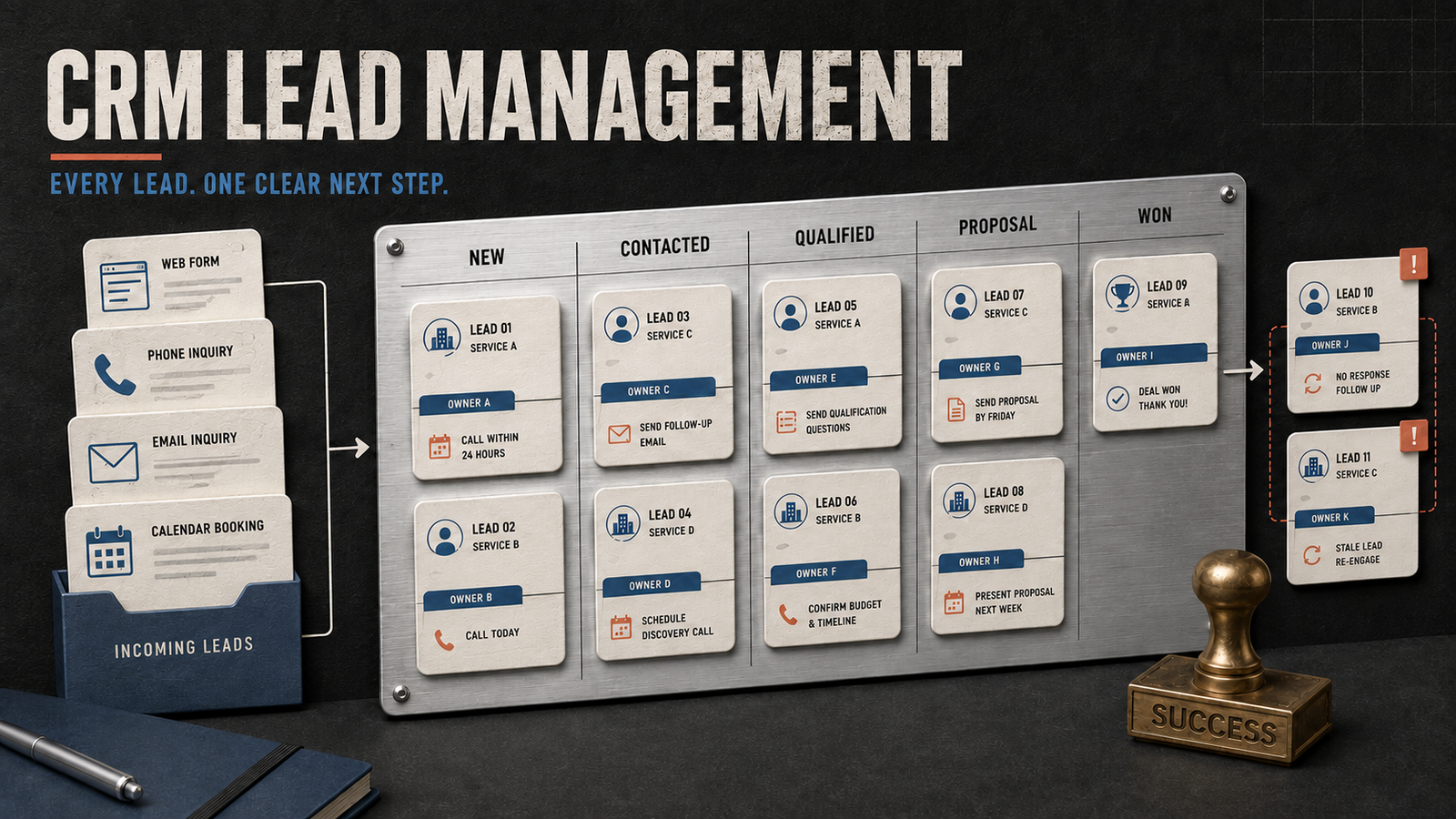
4. What CRM Pipeline Stages Should You Use?
A CRM pipeline should reflect the actual sales process.
Avoid creating too many stages merely because the system allows it. Each stage should represent a meaningful change in the lead’s status.
A practical lead-generation pipeline might include:
New
The inquiry has entered the CRM but has not yet been contacted.
Contact attempted
A representative has tried to reach the lead, but a conversation has not yet taken place.
Contacted
The representative has successfully communicated with the lead.
Qualified
The prospect has a relevant requirement and meets the business’s basic customer criteria.
Appointment scheduled
A consultation, discovery call, demonstration, or meeting has been confirmed.
Proposal shared
Pricing, a quotation, or a formal proposal has been sent.
Negotiation
The prospect is discussing scope, pricing, timing, or commercial terms.
Won
The lead has become a paying customer.
Lost
The opportunity did not convert into a customer.
Invalid or duplicate
The inquiry contained unusable details, was irrelevant, or already existed in the system.
These stages can be adjusted to match the business. However, their definitions should be documented so that everyone uses them consistently.
5. What Information Should Every Lead Record Contain?
A lead record should contain enough information to support qualification, follow-up, and reporting.
At a minimum, record:
- Lead name
- Contact details
- Date and time received
- Service or product requested
- Original source
- Campaign
- Current pipeline stage
- Assigned owner
- Last contact date
- Next action
- Next follow-up date
- Qualification status
- Final outcome
Campaign information should be captured automatically whenever possible.
A clean UTM tracking system can preserve the source, medium, campaign, and creative associated with a website inquiry.
This information allows the business to compare leads generated by different campaigns without relying entirely on manual entry.
Do not collect unnecessary personal information. The CRM should store information that has a legitimate role in customer communication, service delivery, qualification, or reporting.
6. How Should Leads Be Assigned?
Every active lead should have one clearly identified owner.
When ownership is unclear, representatives may assume that someone else is responsible for following up. This often results in delayed or missed communication.
Lead-assignment rules can be based on:
- Geographic territory
- Service category
- Product line
- Language
- Sales representative availability
- Existing customer relationship
- Lead score
- Round-robin distribution
- Business size
- Industry
The best method depends on the sales structure.
A small business may assign all inquiries to one person. A larger team may use automated rules to distribute leads across representatives.
Regardless of the method, the CRM should show:
- Who owns the lead
- When the lead was assigned
- What action is required
- When that action is due
- Whether the action was completed
Assignment creates responsibility. A lead stored in the CRM without an owner is still at risk of being ignored.
7. How Should Follow-Up Tasks Be Managed?
A CRM should make the next action visible.
After every conversation, the representative should record what happens next. Examples include:
- Call tomorrow
- Send service information
- Confirm the budget
- Schedule a consultation
- Share a proposal
- Follow up after one week
- Request missing documents
- Close as unqualified
- Revisit in three months
A status such as “contacted” is not enough. It describes what already happened but does not explain what should happen next.
Every active lead should ideally have:
- A current pipeline stage
- An assigned owner
- A next action
- A due date
This simple structure improves accountability and supports the lead follow-up process.
The objective is not to contact every prospect repeatedly. The objective is to follow up according to the person’s requirement, timing, and level of interest.
8. How Does Lead Scoring Work Inside a CRM?
Lead scoring helps the team decide which inquiries should be contacted first.
The score may consider:
- Customer fit
- Location
- Service required
- Budget
- Purchase timeline
- Decision-making role
- Website activity
- Form responses
- Campaign source
- Previous communication
- Sales feedback
The CRM can then categorize leads as hot, warm, cold, or disqualified.
For example:
- A high-scoring lead can trigger an immediate sales task.
- A medium-scoring lead can enter a structured nurturing sequence.
- A low-scoring but valid lead can receive educational communication.
- An invalid or irrelevant lead can be removed from active follow-up.
The complete lead-scoring guide explains how fit and intent can be evaluated separately.
Scoring should support prioritization, not replace personal judgment. A sales representative may discover important information during a conversation that changes the lead’s priority.
9. How Does a CRM Connect With Conversion Tracking?
A website conversion event confirms that someone completed an action. The CRM shows what happened after that action.
Suppose a campaign generates 50 form submissions.
Website analytics may report 50 conversions, but the CRM may reveal that:
- Some records were duplicates.
- Some contained incorrect contact details.
- Some were outside the service area.
- Some were qualified.
- Some received proposals.
- A smaller group became customers.
This additional information gives marketers a more accurate view of campaign performance.
A reliable conversion-tracking setup should pass useful campaign details into the lead record. The CRM should then preserve those values rather than replacing them during later interactions.
This creates a traceable connection between the advertisement, website action, lead, sales activity, and customer outcome.
10. What CRM Automations Are Actually Useful?
Automation should remove repetitive work while keeping the process understandable.
Useful CRM automations include:
- Creating a lead after a valid form submission
- Assigning the lead to the appropriate representative
- Sending an internal notification
- Creating a first-contact task
- Scheduling a follow-up reminder
- Moving a lead after a defined action
- Identifying records without a next step
- Alerting a manager about overdue tasks
- Sending a confirmation message to the lead
- Updating the lead score after meaningful activity
- Recording the source and campaign
- Marking obvious duplicate records for review
Automation should not create unnecessary messages or move leads through stages without reliable evidence.
For example, an email open should not automatically classify someone as a qualified opportunity. Similarly, clicking a phone number does not confirm that a meaningful call took place.
Automate administrative actions while keeping important qualification decisions visible to the team.
11. How Do You Maintain Clean CRM Data?
A CRM becomes less useful when records are incomplete, duplicated, or inconsistent.
Common data-quality problems include:
- Different spellings for the same lead source
- Missing campaign information
- Multiple records for one person
- Leads without owners
- Opportunities without next actions
- Old leads remaining in active stages
- Inconsistent qualification reasons
- Missing sales outcomes
- Test leads included in reports
- Free-text fields used instead of standard categories
To maintain clean data:
- Create standard values for lead sources and statuses.
- Use dropdown fields for repeated categories.
- Make essential fields required.
- Establish a duplicate-review process.
- Separate test leads from genuine inquiries.
- Review unassigned leads regularly.
- Identify records with overdue tasks.
- Close opportunities that are no longer active.
- Document the meaning of every pipeline stage.
- Audit campaign data for inconsistent naming.
Clean CRM data makes both sales management and marketing attribution more reliable.
12. Which CRM Metrics Should Be Monitored?
The CRM should help the business understand movement through the sales pipeline.
Useful metrics include:
- Total leads received
- Valid leads
- Contact rate
- Average response time
- Qualified leads
- Qualification rate
- Appointments scheduled
- Proposals shared
- Opportunities won
- Lead-to-customer rate
- Average time in each stage
- Leads without follow-up
- Lost-opportunity reasons
- Revenue by lead source
- Cost per qualified lead
- Cost per customer
These metrics should be viewed together.
A high number of leads may not be valuable if the contact or qualification rate is poor. A strong qualification rate may still fail to produce sales if proposals are delayed or follow-up is inconsistent.
The purpose of CRM reporting is to identify where opportunities move forward and where they become stuck.
13. How Should Marketing and Sales Use the CRM Together?
Marketing and sales should agree on several definitions before evaluating performance.
They should define:
- What counts as a valid lead
- What makes a lead qualified
- When a lead becomes an opportunity
- Which pipeline stages should be used
- Which disqualification reasons are available
- How quickly new leads should be contacted
- Which campaign information must be preserved
- Who is responsible for updating sales outcomes
Without shared definitions, marketing may celebrate lead volume while sales focuses on poor-quality inquiries.
The CRM provides a common system where both teams can examine the same records.
Marketing can use sales feedback to improve targeting, messaging, landing pages, and campaign allocation. Sales can use campaign information and lead scores to understand the context behind each inquiry.
This cooperation supports a stronger full-funnel lead-generation strategy.
14. How Do You Build a CRM Lead Management Process?
A practical implementation process can be organized into the following steps:
- Map the existing lead journey.
- Identify every source from which inquiries arrive.
- Define valid, qualified, won, lost, and invalid leads.
- Create a simple set of pipeline stages.
- Decide which fields must be captured.
- Establish lead-assignment rules.
- Define follow-up expectations.
- Connect forms and other lead sources.
- Preserve UTM and campaign information.
- Configure essential notifications and tasks.
- Test the complete process with sample inquiries.
- Train the team on stage definitions and data entry.
- Review pipeline records and sales outcomes regularly.
- Improve the system using actual operational feedback.
Begin with the essential workflow before introducing complex automation.
A simple CRM used consistently is more valuable than an advanced CRM that the team does not understand or update.
Final Thoughts
A CRM does not improve sales performance merely because the software has been purchased.
Its value comes from the process built around it.
Every valid lead should enter the system with accurate source information, receive a clear owner, move through defined stages, and have a visible next action. Sales outcomes should then be recorded so that marketing can understand which campaigns generate qualified opportunities and customers.
This connects the complete journey:
- Campaign
- Website visit
- Conversion
- Lead
- Qualification
- Follow-up
- Proposal
- Customer
When CRM lead management works alongside conversion tracking, UTM naming, lead scoring, and marketing attribution, the business gains a much clearer view of performance.
The most important principle is simple: no active lead should remain inside t